
100% Free & Secure

TNPSC Photo Compressor – Resize to Official Size Free

Resize, compress, and format your photo exactly as per TNPSC requirements in seconds.

Official TNPSC Sample Format

Photo Format
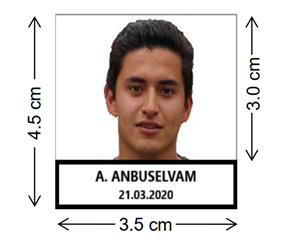
TNPSC photo resized to 276x354 pixels example
1 Upload
2 Convert
3 Download

📷 Convert Photo

276 × 354 px · 20–50 KB · Photograph.jpg

Name is required
Valid date is required

Upload Photograph

Drag & drop or click to browse
JPG, PNG, WEBP supported

Choose File
Preview

How to Resize Your TNPSC Photo in 3 Steps

Resize your passport photograph for TNPSC registration quickly by following these three simple steps.

1

Upload Your Image

Select either the photo or signature mode and upload your file securely from your desktop or mobile device.

2

Add Name & Photography Date

Type your full name and the date of photography. The tool overlays a standard, compliant white text box at the bottom automatically.

3

Compress & Download

Click "Convert" to process. Verify the compliance indicators (PASS status) and click the download button to get your JPEG.

Official TNPSC Photo & Signature Size Requirements

All TNPSC Group 1, Group 2, and Group 4 exam registrations require files to be formatted exactly to these dimensions and file limits.

Document Type Dimensions (Pixels) Dimensions (Metric) File Size Limit DPI Spec
Photograph (with Name & Date) 276 × 354 px 3.5 cm × 4.5 cm 20 KB – 50 KB 200 DPI
Signature 230 × 75 px 6.0 cm × 2.0 cm 10 KB – 20 KB 200 DPI

Note: The TNPSC portal requires the photograph to have a white background, and your name and photo date printed clearly at the bottom. Our tool automates this layout to ensure 100% submission success.

Frequently Asked Questions

Find answers to common questions about TNPSC photo guidelines below.

What is the TNPSC photo size in pixels?

The official TNPSC photo size must be 275x354 pixels (3.5cm x 4.5cm), with a file size between 20KB and 50KB, in JPG format.

Can I resize my TNPSC photo on mobile?

Yes, this tool works entirely in mobile web browsers, allowing you to resize, compress, and download your TNPSC files on any smartphone.

Is this TNPSC photo compressor free?

Yes, this tool is 100% free with no registration, email, or sign-ups required to format and download your images.

Does this tool add name and date automatically?

Yes, you can enter your name and photography date to overlay a compliant white text strip at the bottom of the photo automatically.

Ready for the TNPSC Exam? Practice Previous Year Questions on JustTNPSC