TNPSC Photo and Signature Compressor & Resizer (2026)
Convert Your Photo & Signature to TNPSC Format Instantly
Resize, compress, and format your photo or signature exactly as per TNPSC requirements in seconds.
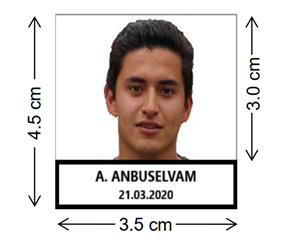
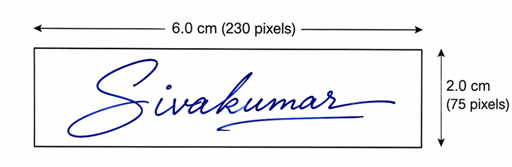
Official TNPSC Sample Format
Photo Format
Signature Format
100% Free
🔒 Secure
✓🗑️ Auto-Delete
✅ TNPSC-Ready
1Upload
2Convert
3Download
📷Convert Photo
276 × 354 px · 20–50 KB · Photograph.jpg
Name is required
Valid date is required
Upload Photograph
Drag & drop or click to browse JPG, PNG, WEBP supported
Choose File
Processing Complete
Original
Processed
🎉✅ Upload Ready Your image is formatted as per TNPSC specifications. ✅
TNPSC Compliance Summary
✍️Convert Signature
230 × 75 px · 10–20 KB · Signature.jpg
Upload Signature
Drag & drop or click to browse JPG, PNG, WEBP supported
Choose File
Processing Complete
Original
Processed
🎉✅ Upload Ready Your image is formatted as per TNPSC specifications. ✅
TNPSC Compliance Summary
How to Resize Your TNPSC Photo in 3 Steps
Resize your passport photograph for TNPSC registration quickly by following these three simple steps.
1
Upload Your Image
Select either the photo or signature mode and upload your file securely from your desktop or mobile device.
2
Add Name & Photography Date
Type your full name and the date of photography. The tool overlays a standard, compliant white text box at the bottom automatically.
3
Compress & Download
Click "Convert" to process. Verify the compliance indicators (PASS status) and click the download button to get your JPEG.
Official TNPSC Photo & Signature Size Requirements
All TNPSC Group 1, Group 2, and Group 4 exam registrations require files to be formatted exactly to these dimensions and file limits.
Document Type
Dimensions (Pixels)
Dimensions (Metric)
File Size Limit
DPI Spec
Photograph (with Name & Date)
276 × 354 px
3.5 cm × 4.5 cm
20 KB – 50 KB
200 DPI
Signature
230 × 75 px
6.0 cm × 2.0 cm
10 KB – 20 KB
200 DPI
Note: The TNPSC portal requires the photograph to have a white background, and your name and photo date printed clearly at the bottom. Our tool automates this layout to ensure 100% submission success.
Why Use TNPSCPhotoResizer.com
Our utility is specifically engineered for TNPSC aspirants to solve formatting errors instantly.
100% Client-Side Privacy: No images or personal details are uploaded to any server. All processing runs directly in your browser.
Automatic Name/Date Overlays: Get perfect aligned white banners with standard typography instantly.
Iterative Compression Engine: Automatically adjusts JPG compression levels to hit the exact target file size (e.g. between 20KB and 50KB).
DPI Header Injection: Injects the required 200 DPI metadata in the JPEG headers to bypass strict online verification gates.
Common Reasons TNPSC Photos and Signatures Get Rejected
To ensure your One Time Registration (OTR) and exam application are accepted instantly, avoid these common image mistakes that trigger automatic portal rejection:
Wrong Background Color: TNPSC guidelines mandate a plain white or very light-colored background. Patterned backgrounds, curtains, outdoor backgrounds, or shadows will result in rejection.
Missing Name and Date Banner: The photograph must contain a white strip at the bottom clearly displaying the applicant's name and the date of photography. Uploading a plain passport photo without this is a primary rejection cause.
Invalid File Formats: The TNPSC OTR portal accepts only JPEG/JPG formats. Uploading PNG, WebP, PDF, or HEIC files from modern smartphones will fail.
File Size Outside Range: Photos must be strictly between 20 KB and 50 KB. Signatures must be strictly between 10 KB and 20 KB. A file size of even 50.1 KB or 9.9 KB will be rejected by the automated validation script.
Low Resolution or Wrong DPI: Images must be scanned or rendered at 200 DPI. Blurry, low-quality photos or signature crops cannot be verified and are flagged.
Incorrect Signature Style: The signature must be in natural running handwriting using a blue or black ballpoint pen on plain white paper. Do not use block or capital letters.
Frequently Asked Questions
Find answers to common questions about TNPSC photo and signature guidelines below.
What is the TNPSC photo size in pixels?
The official TNPSC photo size must be 275x354 pixels (3.5cm x 4.5cm), with a file size between 20KB and 50KB, in JPG format.
What is the TNPSC signature size in KB?
The TNPSC signature size must be between 10KB and 20KB, with pixel dimensions of 230x75 pixels (or 275x118 pixels depending on the notification).
Can I resize my TNPSC photo on mobile?
Yes, this tool works entirely in mobile web browsers, allowing you to resize, compress, and download your TNPSC files on any smartphone.
Is this TNPSC photo compressor free?
Yes, this tool is 100% free with no registration, email, or sign-ups required to format and download your images.
Does this tool add name and date automatically?
Yes, you can enter your name and photography date to overlay a compliant white text strip at the bottom of the photo automatically.